What Happened to Facebook Graph Search
The original Graph Search changed the mental model for Facebook search. Before it, users thought in terms of keyword lookup, the same way they would search a page title or a post body. Graph Search pushed the platform toward semantic discovery across relationships and shared content, so queries could traverse people, photos, places, interests, and the connections among them TechCrunch coverage of the 2013 launch.
That mattered because the thing being searched wasn't a document corpus in the usual web sense. It was a social graph, full of tags, captions, check-ins, comments, and connections that made content discoverable through relationships instead of plain text. For users, that made natural-language style discovery feel magical. For platform engineers, it exposed a massive privacy surface area almost immediately CBC reporting on Graph Search privacy concerns.
The user-facing product and the API are not the same thing
A lot of developers still conflate the old consumer product with today's Graph API. That's the wrong mental model. Graph Search was a search experience, while the Graph API is a programmatic surface for specific objects and permissions, with search behavior constrained by what Meta exposes and what the user or app is allowed to see.
That distinction matters because the old interface implied broad discovery, while modern access is selective. You can't treat the Graph API like a magical query engine over the whole network. You're operating inside explicit visibility boundaries, and the feature historically had no dedicated API for operationalizing that old search experience in a general business workflow HuffPost background on the lack of a dedicated API.
Practical rule: if a query feels like it should work because it worked in the old search box, assume it probably won't survive the modern permission model unchanged.
A useful way to think about search graph Facebook in 2026 is this. The original product was about broad consumer discovery. What remains for developers is targeted retrieval of permitted objects, not unrestricted graph-wide exploration. That's why planning starts with object type, scope, and visibility, not with query creativity.
How Social Graph Search Architecture Works
The architecture behind social graph search is different from a web crawler. A search engine like Google indexes pages as largely self-contained documents. A social graph system has to index relationships, edges, and entities that can be traversed in multiple directions, often under strict visibility controls. That's why Meta's Unicorn system is described as an online, in-memory social-graph search layer that indexes trillions of edges across tens of billions of users and entities on thousands of commodity servers, and answers billions of queries per day with latencies in the hundreds of milliseconds Meta research on Unicorn.
The design tells you a lot about what works in practice. Graph retrieval depends on aggressive sharding, in-memory access, and graph-aware indexing. That combination is powerful, but it's also unforgiving. When you ask for broad, unconstrained traversal, the system has to inspect huge relational surfaces very quickly, which is why search semantics are tightly managed rather than left open-ended.
Why this matters to developers
If you're building search on top of a social graph, you're not just asking, “Does this object exist?” You're asking, “Can I reach this object through this relationship path, under this permission set, fast enough to return a usable response?” That's a very different problem. The answer often depends more on index design and access policy than on the text of the query itself.
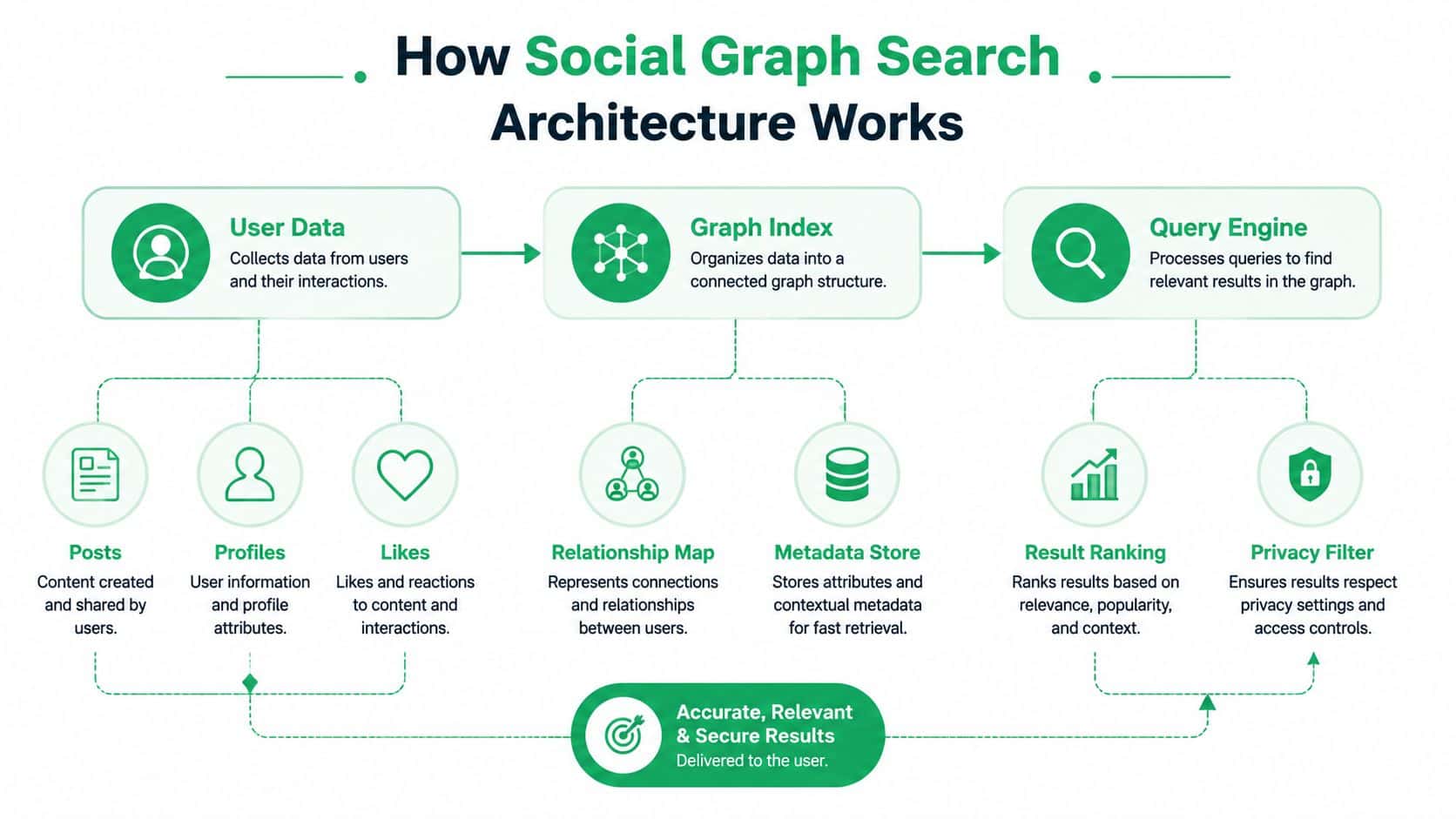
The practical consequence is simple. Some query shapes are efficient because they align with how the graph is stored and partitioned. Others become expensive, noisy, or incomplete because they require traversing too much of the graph or crossing visibility boundaries that the query layer can't bypass. That's why architecture and product design can't be separated here. The system's shape determines the kinds of search experiences you can promise.
The fastest social search systems don't try to be clever at query time. They pre-decide what's indexable, what's visible, and what can be ranked without blowing up latency.
That tradeoff explains why graph search at consumer scale feels fluid when it works, but brittle when you try to turn it into a general-purpose developer primitive. The hardware can be fast. The semantics are still strict.
Token-Based Indexing and Query Matching
A common mistake is assuming Facebook search behaves like phrase search in a classic search engine. It doesn't. Meta's developer documentation says content is registered into an index built from tokens extracted from text fields, and queries are matched against those tokens with exact token matching at query time Meta developer documentation on search quality. That means word order is not the main driver of recall.
This matters more than many teams expect. If your query includes the right words, but in a different order, the system can still return equivalent matches because it's matching tokens independently rather than treating the phrase as an inseparable string. In practical terms, the index cares more about what terms appear than about the exact phrasing you typed.
What token matching changes
Token-based indexing shifts the burden onto normalization, locale handling, and ranking. If your content includes compound names, multilingual text, or locale-specific punctuation, tokenization can split or normalize the input in ways that change what matches. That's not a bug in the search layer, it's the mechanism.
It also means developers can't rely on phrase matching for precision. A query that looks specific may still return broader results if the tokens are common enough. Conversely, a query that seems natural to a human can fail if tokenization breaks the field in an unexpected way. This is one reason social graph search feels less deterministic than database filtering.
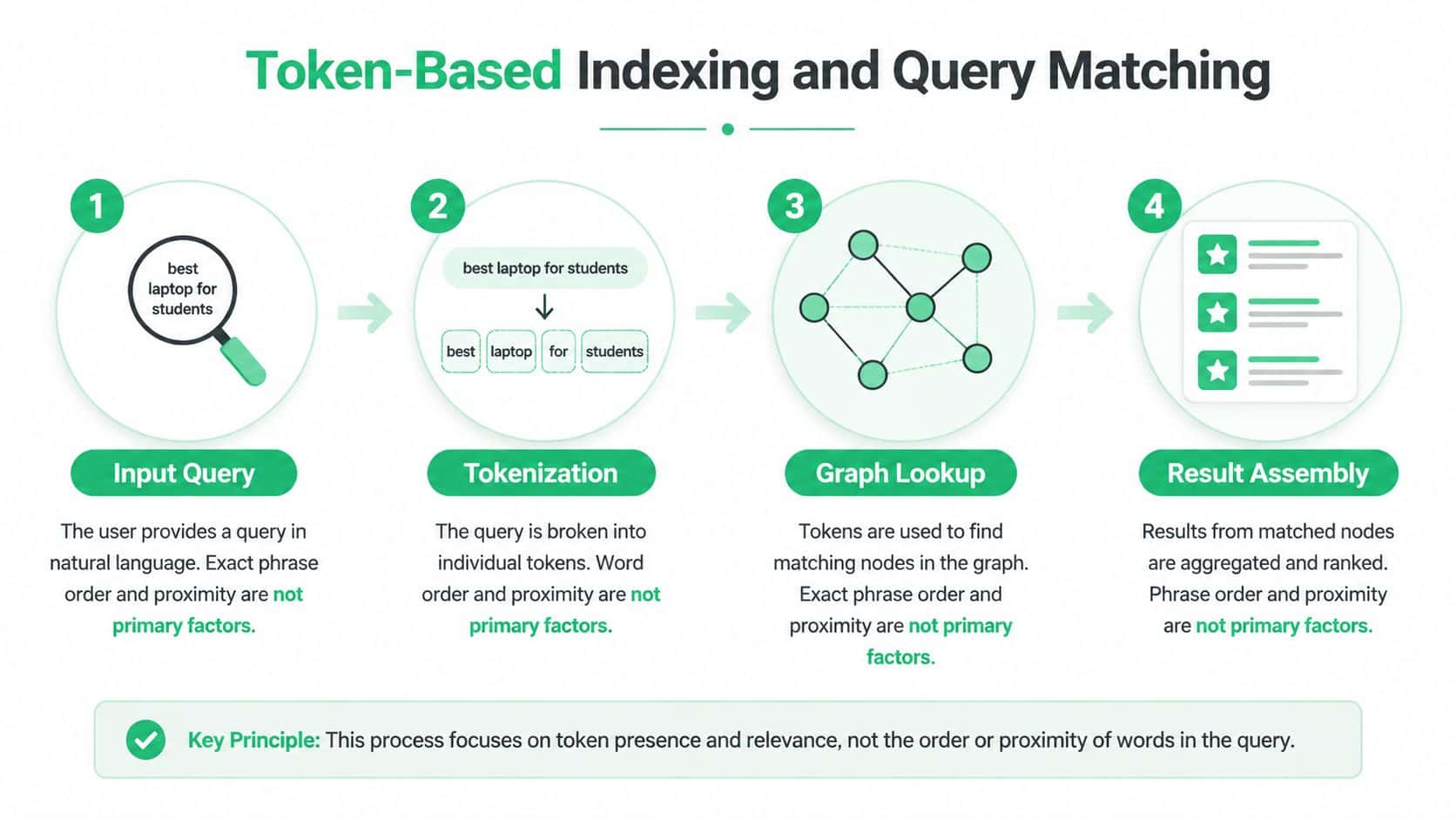
Here's the engineering takeaway. Write search logic as if order is helpful for ranking, not required for matching. If you need strict phrase semantics, you have to add your own post-filtering after retrieval, because the underlying pipeline is token-first.
That limitation is easy to miss when the docs show successful examples. The examples tend to look clean because the data is clean. Real content isn't. Users write inconsistent labels, post in different languages, and omit key fields. Token matching makes that mess searchable, but it also makes exactness harder to guarantee.
Practical Graph API Search Endpoints and Queries
The modern developer path is not a broad Graph Search box, it's the Graph API /search endpoint with a specific object type. In practice, you choose the object class first, then tune the query fields around it. That's a more disciplined way to work, and it's the only way to stay inside the platform's permission model.
A simple pattern looks like this:
GET /search?type=page&q=coffee
That kind of request is useful for discovering Pages by keyword. For places, groups, users, or events, the shape changes, but the logic stays the same. You pick the searchable object type, provide the query term, then narrow the result set through follow-up filtering where needed. Search is not a replacement for object retrieval, it's the front door.
Endpoint choice beats clever phrasing
For real systems, the interesting work happens after the initial search. You often need to combine a keyword query with location filtering, category filtering, or permission checks in your app layer. That's where developer expectations diverge from platform reality. The API may return candidates, but your application still has to decide which ones are usable.
| Graph API Search Endpoints Comparison |
|
|
|
| Search Type |
Required Permission |
Typical Use Case |
Result Limitations |
| Page |
App and user-visible permissions for the object scope |
Brand, business, or community discovery |
Only objects visible within the permitted scope |
| Place |
Location-aware access where applicable |
Venue or store lookup |
Can be narrowed by location and still miss private or restricted entries |
| Group |
Access governed by group visibility and app permissions |
Community discovery and moderation tooling |
Private groups and restricted content won't surface broadly |
| User |
Strict user permission boundaries |
Limited identity lookup in approved contexts |
Highly constrained by privacy and app access |
| Event |
Visibility and permission dependent |
Public event discovery |
Private or invite-only events stay hidden |
What does this look like in production? You start with the smallest query that can possibly work. Then you inspect whether empty results came from poor token choice, insufficient visibility, or a missing permission. That debugging order matters because it prevents you from treating privacy filtering as an indexing failure.
If you're building around search, the endpoint is only half the story. The other half is response handling. Result sets are often partial, and that's normal. Good clients treat search as candidate generation, not truth.
Privacy Constraints That Break Your Queries
The most common reason a Graph API search returns nothing is privacy doing its job. Facebook's Graph Search changes made it harder to hide an entire timeline from search results, while individual items could still be protected with stricter item-level privacy settings. That split still shapes what developers can and can't see CBC reporting on the 2013 privacy changes.
Only public or permissioned content appears in modern search flows. If the user hasn't granted your app the relevant access, or if the content sits behind item-level privacy, your query can look syntactically correct and still return an empty list. The API is refusing to disclose data you do not have rights to inspect.
The part that breaks production assumptions
Developers usually notice this first when staging and production behave differently. Test accounts often have sparse, controlled data. Real users have mixed privacy settings, uneven permissions, and content scattered across object types. Search quality seems to degrade, but the issue is that your sample set was never representative.
Privacy filters should be treated as a first-class source of empty results, not an edge case.
You need to design for that from the start. Show partial-result messaging. Avoid claiming that a missing record means a missing object. If your workflow depends on complete discovery, use explicit fallback paths and tell users that some content may be hidden by visibility rules. The right user experience is honest about scope instead of pretending the API is exhaustive.
A practical checklist for search UX is straightforward:
Be explicit about scope. Tell users whether you're searching public Pages, places, or content tied to granted permissions.
Handle partial matches gracefully. Don't fail the whole flow because one object type came back empty.
Differentiate no results from no access. Those are different outcomes, and users shouldn't have to guess which one happened.
Document visibility limits. If content can be hidden, say so in the UI before they depend on it.
For teams that need a clear privacy baseline, the policy language and product requirements should be reviewed before feature design, not after. A useful starting point is Bulkit's privacy overview, which is a reminder that permission boundaries need to be part of the engineering plan, not a late-stage support issue.
The old Graph Search controversy made this obvious years ago. People did not just worry about access, they worried about discoverability itself, because search made hard-to-find status updates, captions, check-ins, and comments easier to surface. That same lesson applies to modern app design. If content can be hidden, your search layer has to respect that fact and still behave predictably.
The 2019 Deprecation and What Remains Today
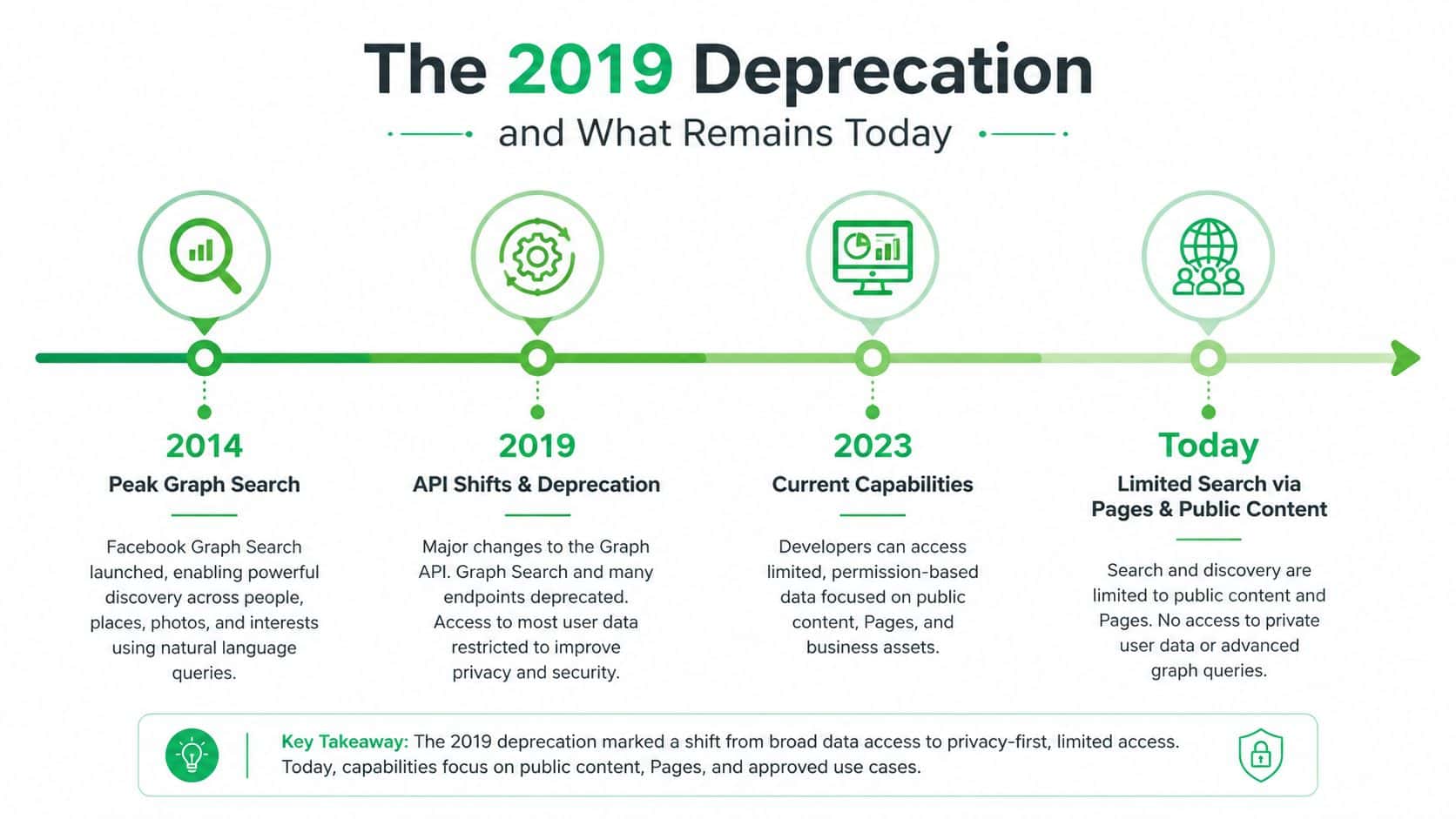
By 2019, Meta had already paused parts of Graph Search, and the feature had shifted from a live product to a legacy capability tied to unwanted disclosure and investigative use across the network's content VICE reporting on the 2019 shift. That is the line developers need to keep in mind. The original user-facing discovery model is not what modern integrations are built against.
What remains is narrower and more operational. The Graph API still exposes search-style access for certain object categories, but the practical scope is closer to pages, places, and groups than to the broad 2013 search vision. The surface still exists. The promise behind it does not. And because the feature never had a clean, dedicated API path, it was not a simple business primitive to begin with HuffPost background on operational limits.
How to decide whether to use it
If your use case is public entity discovery, Graph API search can still be useful. If you need deeper social investigation across people, posts, or hidden relationships, the platform will not give you that reliably, and you should plan for another data source or a different product design.
The practical split is simple. One path is approved object lookup with visibility constraints. The other path tries to recreate the old semantic search experience, which is where teams run into policy friction, empty results, and maintenance cost. The first path can ship. The second usually stalls.
You also have to account for lifecycle changes. Meta keeps shipping Graph API version updates and deprecations, so anything you build needs to tolerate shifts in fields, permissions, and availability instead of assuming stable behavior. The Graph API changelog is the kind of source teams should watch for that. Search makes those shifts harder to debug because missing fields often look like empty data, not an obvious break.
Permission boundaries matter as much as endpoint choice. If your internal review depends on a shared glossary, you should align the product terms with Bulkit's terms before you wire search into the workflow.
The safest rule is simple. Treat modern Facebook search as a constrained retrieval layer, not as a public social search engine.
Building Social Search Features That Work
The teams that ship reliable social search features don't chase the old Graph Search promise. They design for limited visibility, token-based matching, and incomplete results from day one. That means search is only the candidate generator, then app-side filtering, caching, and user-facing explanations do the rest.
A strong implementation usually has three traits. First, it asks the narrowest possible query and does not depend on phrase order. Second, it degrades gracefully when privacy rules remove content. Third, it blends Graph API search with other sources when the platform cannot supply complete discovery on its own. That can include internal databases, approved third-party datasets, or separate social tools depending on the use case.
A practical implementation pattern
Start by caching frequent queries that are safe to reuse, especially if your app repeatedly searches the same public objects. Then add progressive disclosure in the UI so users can refine search terms when the initial result set is thin.
You also want to treat search as a product choice, not just an endpoint choice. A platform comparison like Bulkit's comparison page helps teams decide whether they want one integration model across networks or separate code paths for each one. That trade-off matters because the search layer is usually where permission gaps and maintenance costs show up first.
Design rule: build social search so the user still gets a useful answer when the graph only returns part of the truth.
That rule matters even more as the platform changes. Meta's direction points toward tighter controls, not looser ones. The better architecture is the one that fails cleanly when the platform says no, and keeps the rest of the workflow understandable.
If you are planning a social feature now, write down the objects you need, the visibility you can tolerate, and the fallback path for missing results. Then implement the smallest query that can support that design. When a team wants a unified API, SDKs, webhooks, and a consistent data model, Bulkit is one option for reducing the amount of per-platform search plumbing it has to maintain.