Most marketing teams do not fail at social media because they lack ideas. They fail because distribution is manual, repetitive, and easy to drop the moment a product launch or campaign gets busy. You publish a blog post, copy the link into four tabs, rewrite the caption from scratch, forget to attach UTM parameters on two networks, and skip the follow-up thread entirely.
Well-designed social media marketing automation workflows fix the operational drag without turning your brand feed into robotic spam. The goal is not to remove humans from marketing; it is to automate the plumbing (triggers, formatting, asset routing, scheduling, retries, and reporting) so marketers spend their time on positioning, creative direction, and actual conversations.
Below are six battle-tested marketing automation workflow examples you can deploy with n8n, Make, Zapier, or a unified social media scheduling API, followed by the guardrails that keep automated pipelines from breaking in production.
The Anatomy of a Reliable Marketing Automation Workflow
Before building individual flows, every dependable marketing workflow automation follows the same five-stage architecture. Skipping stage three (the guardrail) is where most "set-and-forget" setups go wrong.
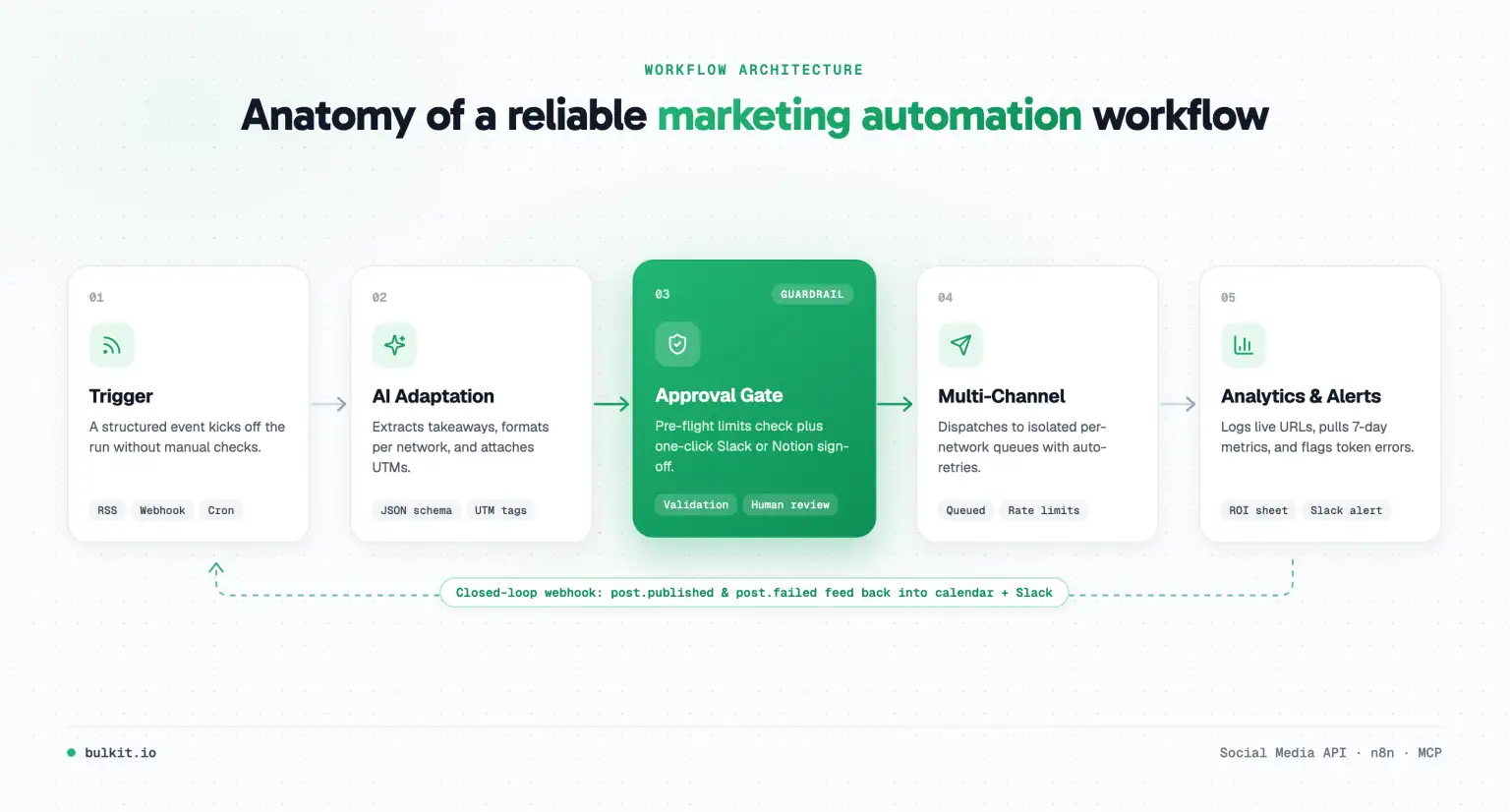
- Trigger: A structured event starts the run: a new RSS entry, a CMS webhook, a new row in Airtable or Notion, a YouTube upload, or a weekly cron schedule.
- Enrichment and adaptation: The workflow pulls the source text, strips HTML noise, appends consistent UTM parameters, and generates network-specific copy variants rather than blasting identical text everywhere.
- Validation and approval gate: Automated checks verify character limits, media aspect ratios, and required fields. For high-visibility accounts, the draft lands in Slack, Notion, or Airtable for a one-click human sign-off.
- Delivery and scheduling: Approved variants are dispatched through per-network queues or a single publishing layer so a temporary failure on one channel does not stall the rest.
- Closed-loop feedback: Publish and failure webhooks log the external post URL back to your content calendar and alert the team immediately if an OAuth token expires or a network rejects a payload.
If you publish regularly on a blog, newsletter, or podcast, automating blog content posting to social media from RSS feeds is the fastest workflow to ship and the easiest to maintain. Instead of manually copying every new URL into four dashboards, your RSS feed becomes the single trigger for multi-channel distribution.
How the blueprint works
- Trigger: Poll your blog or Substack RSS feed every 15–30 minutes (or fire a webhook directly from your CMS on publish).
- Deduplication check: Store each item's
guid or canonical URL in a lightweight datastore (Airtable, Notion, or n8n static data) so feed refreshes never double-post.
- Per-network rewrite: Pass the article title, meta description, and key takeaways to an LLM step with a strict JSON schema output:
- LinkedIn: A 3-paragraph practitioner takeaway with a clear hook and a question at the end.
- X: A concise 2-sentence insight under 240 characters plus the tracked URL.
- Threads / Bluesky: A conversational native summary without stuffing hashtags.
- Staggered schedule: Publish the LinkedIn and X announcements on day one, then queue a secondary angle (a quote, stat, or checklist from the same article) 5 to 7 days later.
Practical tip: Never map the raw RSS <title> straight into every social post. A 60-second prompt template that extracts one concrete takeaway from the article body consistently outperforms bare "New blog post:" announcements.
2. Long-Form Content Repurposing Pipeline
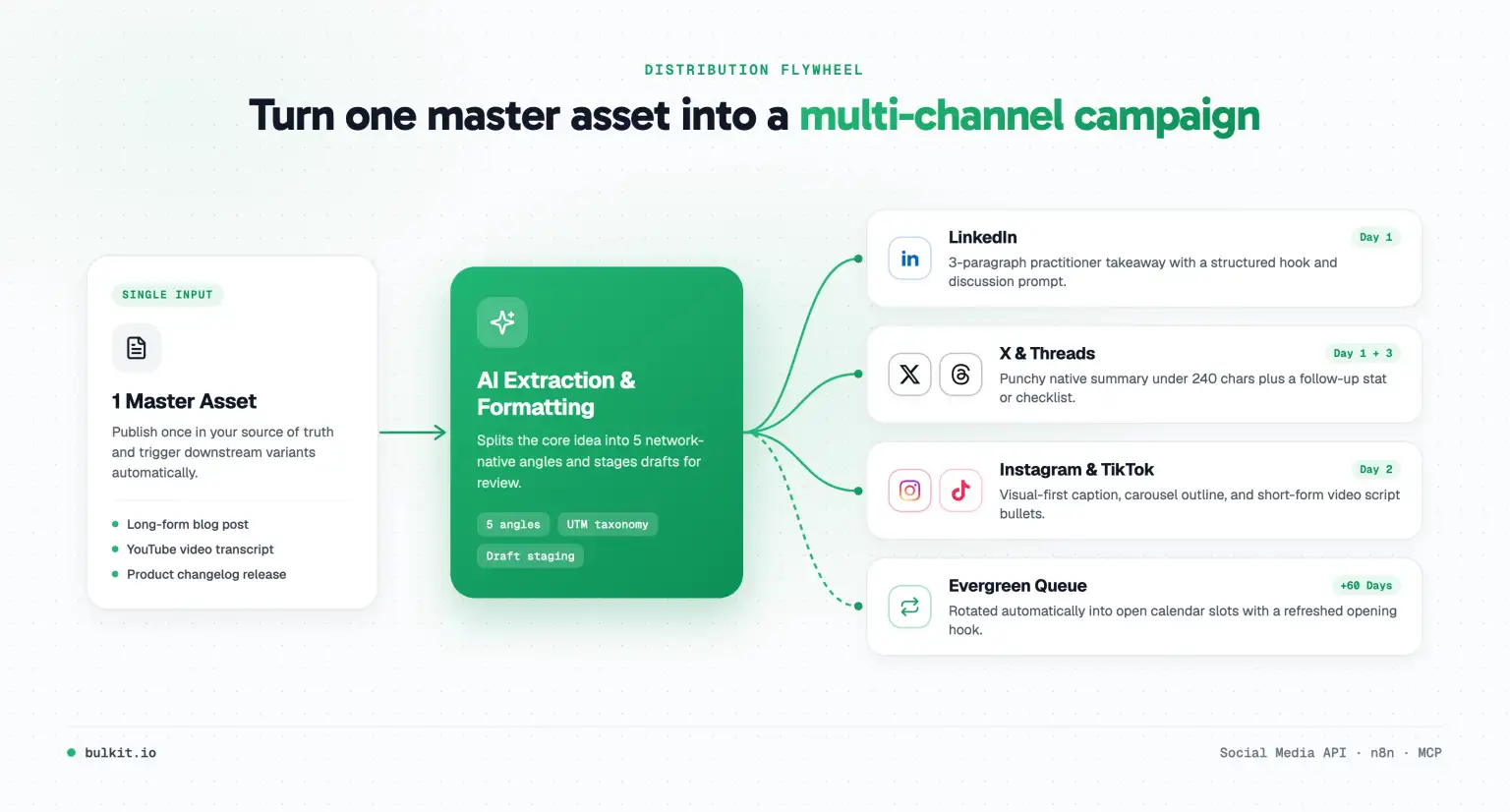
One 15-minute YouTube video, webinar, or deep-dive guide contains enough material for two weeks of social posts, provided you have a repeatable pipeline to slice it. This workflow turns a single master asset into a multi-format campaign without manual copy-pasting.
How the blueprint works
- Trigger: A new document is moved to an
Approved folder in Google Drive, or a new video appears on your YouTube channel.
- Extraction: Fetch the transcript or markdown body and split it into 3–5 standalone themes (a contrarian insight, a step-by-step framework, a data point, and a quick-win tip).
- Variant generation: Generate platform-native drafts mapped to each network's rules: short hooks for X, structured scannable posts for LinkedIn, visual captions for Instagram, and script bullets for TikTok. For exact character limits and media ratios, see our guide to cross posting on social media.
- Human-in-the-loop staging: Write every draft into a shared Airtable or Notion content calendar with status
Needs Review, alongside the source asset link and target publish date.
- Automated dispatch: A second workflow watches for records whose status changes to
Scheduled and pushes them to your publishing queue with the right media attachment and timestamp.
Keeping the staging table in the middle gives your team full editorial control while cutting production time from hours to a ten-minute review pass.
3. Product Launch & Changelog Distribution
Engineering and product teams ship improvements every week, yet most updates die quietly inside release notes. Connecting your changelog directly to your marketing channels turns routine shipping into a steady stream of product marketing.
How the blueprint works
- Trigger: A new GitHub Release, Linear milestone, or changelog entry published in your CMS.
- Translation layer: Raw commit titles are written for engineers, not buyers. Use a transformation prompt with your product positioning doc as context to rewrite the release notes into customer-facing benefits ("what changed, why it matters, and who it helps").
- Asset check: Pull the attached demo screenshot or short screen recording from the release payload. If no visual is attached, route the draft to a
#marketing-launches Slack channel asking for a visual before scheduling.
- Multi-channel fan-out: Queue the announcement across LinkedIn (company page + founder draft), X, and Bluesky with consistent campaign tracking (
utm_campaign=changelog-2026-11).
4. Evergreen Content Recycling Queue
Most social feeds have a half-life measured in hours. Your best tutorials, customer stories, and comparison guides deserve more than a single appearance, but manually re-queuing them every quarter rarely happens.
How the blueprint works
- Source library: Maintain an
Evergreen view in Notion or Airtable containing proven posts tagged by pillar (tutorials, product tips, case studies) and a Last Published At date field.
- Trigger: A weekly cron schedule (for example, every Monday at 09:00 UTC) picks 2–3 entries whose
Last Published At is older than 60 days.
- Fresh angle rotation: Instead of reposting identical copy (which can trigger duplicate-content filters on X and bore returning followers), pass the original post and its source URL through a rewrite step that rotates the opening hook (stat-first, question-first, or mistake-first).
- Queue & update: Schedule the refreshed variants across open slots in the upcoming week and update
Last Published At immediately so the same item cannot be picked twice.
5. AI Agent Content Ops (n8n + MCP)
Traditional workflows follow rigid if/then branches. With n8n marketing automation nodes and the Model Context Protocol (MCP), teams are moving to semi-autonomous content operations where an AI agent drafts, formats, and schedules posts using real publishing tools while still respecting strict approval boundaries.
How the blueprint works
- Inputs: Give your agent read access to your product docs, recent customer questions, and blog archive, plus tool access to a publishing server like the Bulkit MCP server.
- Daily or weekly briefing: On a schedule (or on demand in Claude/Cursor), the agent proposes three campaign posts tied to this week's priorities, complete with platform-specific copy and suggested publish windows.
- Draft-only permission by default: Configure the workflow so the agent creates
draft or pending_approval jobs rather than publishing live without review.
- One-click promotion: Once a marketer approves the batch in Slack or the dashboard, the scheduling layer handles media upload, per-platform validation, and timed delivery.
This pattern works especially well for solo founders and lean growth teams who want daily consistency without spending every morning inside a social composer.
6. Closed-Loop Reporting & Failure Alerts
Automation without observability is just silent failure. If an Instagram token expires on Tuesday morning and nobody notices until Friday, your entire week of scheduled launches vanishes.
How the blueprint works
- Webhook listener: Subscribe to
post.published and post.failed events from your publishing layer (for example, using the Bulkit Trigger node in n8n).
- Instant failure triage: On
post.failed, post an alert into #marketing-ops on Slack with the target network, the exact error message, and a direct link to edit or retry the job.
- Centralized ledger: On
post.published, append the live post URL, platform, canonical campaign ID, and publish timestamp to a master Google Sheet, BigQuery table, or Airtable base.
- 7-day performance snapshot: A delayed follow-up run fetches impressions, clicks, and engagements 7 days after publish so you can compare which workflow (RSS syndication, repurposing, or changelog updates) actually drives pipeline.
Choosing Your Automation Stack: n8n vs. Make vs. Zapier vs. Direct API
The best tool depends on your monthly volume, technical comfort, and how much custom logic (especially AI steps and error handling) your workflows require.
| Platform |
Best fit |
Pricing dynamics |
AI & branching power |
Maintenance trade-off |
| Zapier |
Non-technical teams running simple linear flows |
Per-task pricing; gets expensive at high volume |
Basic branching and built-in AI steps |
Fastest setup, lowest flexibility |
| Make |
Visual marketers building multi-branch content pipelines |
Per-operation pricing; moderate at mid-volume |
Strong visual routers, iterators, and HTTP modules |
Great middle ground; can get noisy on huge scenarios |
| n8n |
Growth engineers, agencies, and high-volume AI workflows |
Flat self-hosted server cost or execution-based cloud |
Native AI Agent nodes, JavaScript/Python code steps, community nodes |
Slightly steeper setup; best cost curve at scale |
| Unified API / MCP |
Product teams embedding automated publishing inside apps or agents |
Predictable usage-based API pricing |
Full programmatic control, typed validation, webhooks |
Requires light code, eliminates per-network OAuth & SDK debt |
Whichever orchestrator you pick, avoid wiring five separate native social media APIs directly inside your workflow unless you enjoy debugging broken OAuth refreshes and silent media upload errors. Using a unified publishing layer (or the Bulkit n8n node / API) lets your workflow send one clean payload and offload retries, rate limits, and platform quirks. If you are evaluating publishing APIs, compare the options in our best social media APIs guide.
5 Guardrails That Keep Automated Workflows Safe
Automation amplifies whatever you feed it: good systems and sloppy mistakes alike. Add these five safeguards before turning any workflow live:
- Idempotency keys on every run: Hash the source URL + target network + campaign date so a retried webhook or flaky RSS feed never publishes duplicate posts.
- Pre-flight validation before scheduling: Check character counts, required media dimensions, and broken URLs upfront. Failing fast during draft creation is far better than failing at 9:00 AM on launch day.
- Human-in-the-loop for sensitive topics: Keep full auto-publish for low-risk flows (like curated evergreen tips or routine RSS links) and require manual sign-off for launches, pricing updates, and AI-written thought leadership.
- Per-network rate-limit spacing: Never fire 20 posts in the same second. Stagger schedules across time windows and isolate queues per network so a throttle on X does not delay LinkedIn.
- Token expiry and dead-letter alerts: Monitor OAuth connection health and route every failed execution to a Slack channel or email inbox with actionable error details.
How to Measure the ROI of Marketing Automation Workflows
A workflow is only worth keeping if it saves measurable time or produces measurable distribution lift. Track four simple metrics for 30 days after launch:
- Hours reclaimed per week: Compare manual copy-pasting, resizing, and scheduling time before vs. after deployment.
- Publishing consistency: Measure how many planned slots actually went live across every target network without missed days.
- Distribution multiplier: Track how many network-native assets you generate from each long-form piece (aim for 5–8 adapted posts per blog post or video).
- Attributed clicks and conversions: Standardize
utm_source, utm_medium=social, and utm_campaign=<workflow-name> inside your automation template so analytics automatically separate RSS syndication traffic from repurposed thought leadership.
Start with one workflow (usually RSS-to-Social or Content Repurposing), run it in draft-approval mode for two weeks, inspect the output quality, and only then expand to your next blueprint.